
SEPA QR Code Generator
Create EPC/GiroCode QR codes for invoices: scannable by European banking apps. Free, private, no signup.
Create a SEPA QR code
Fill in the payment details: the QR encodes them per the EPC069-12 standard.
EPC payload is validated: IBAN checksum is checked, amount is capped at €999,999,999.99, and total payload at 331 bytes per the standard.
How this tool works
This tool is designed for testing, education and workflow prototyping. It validates or generates structurally correct values based on published format rules and clearly states where no live-bank lookup is performed.
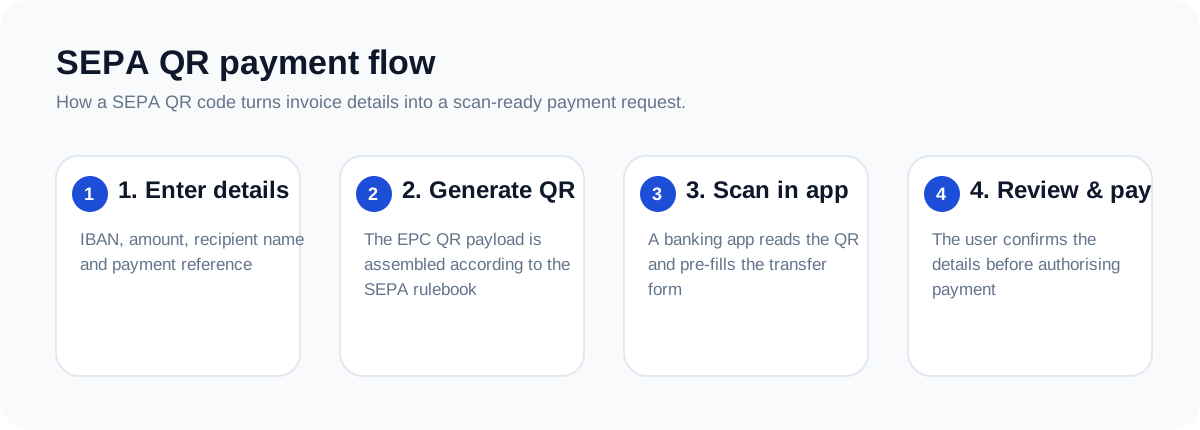
What is a SEPA QR code?
A SEPA QR code (officially EPC QR, nicknamed GiroCode in Germany) lets someone pay you by scanning instead of typing. Banking apps across the SEPA area read the code and pre-fill the transfer: recipient, IBAN, amount, and reference. Put one on invoices or donation pages and you get paid faster, with fewer typos.
The EPC069-12 payload
The QR encodes plain-text lines in a fixed order:
| Line | Content | Example |
|---|---|---|
| 1 | Service tag | BCD |
| 2 | Version | 002 |
| 3 | Character set | 1 (UTF-8) |
| 4 | Identification | SCT |
| 5 | BIC | COBADEFFXXX |
| 6 | Recipient name | Acme GmbH |
| 7 | IBAN | DE89370400440532013000 |
| 8 | Amount | EUR99.50 |
| 9 | Purpose (optional) | SUPP |
| 10 | Reference | Invoice 2026-001 |
Rules worth knowing
- Amount maxes out at €999,999,999.99; leave it empty for an open amount.
- The whole payload must fit in 331 bytes.
- Use either a structured RF creditor reference or free-text remittance: not both.
- The IBAN is checksum-validated before the QR is drawn, so you never ship a broken code.
Who is it for?
- Freelancers & small businesses adding scan-to-pay to PDF invoices.
- Clubs & nonprofits collecting membership fees and donations.
- Developers embedding payment QRs in checkout and billing flows.